
Export from the editor
Open the project menu
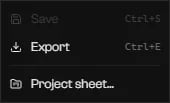
The project badge menu: Save, Export, and Project sheet….
Choose the folder
resources/ folder.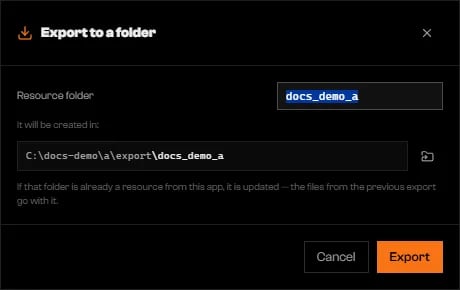
The resource folder name and where it will be created.
Read the result
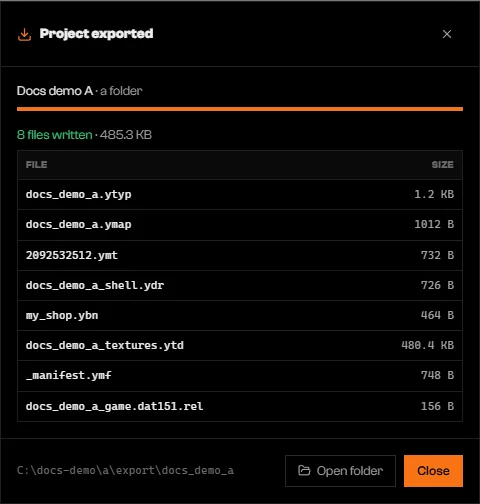
The files written for a project with one structure.
What a structure adds
.ytyp and .ymap. The game keeps using the original interior’s model.
Put it on the server
Copy the folder into resources
resources/ folder.Ensure the resource
ensure followed by the folder name to server.cfg, then restart the server. Rageon does not add the line.Go to the structure
Structures on the Map tab
Your saved structures can appear on the Map next to the game’s own content.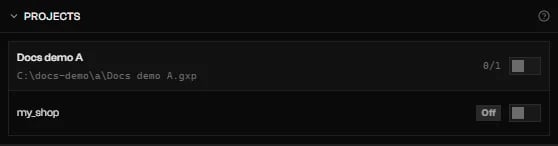
Add-ons › Projects: a project and its structure, with switches.
Limits and plans
Export needs a signed-in account: if the session has expired, sign in again and export again. Your plan limits structures per project and interiors per structure, and export checks both again. See pricing.Troubleshooting
Export blocked: … problem(s) prevent writing the resource. Click one to mark the culprit.
Export blocked: … problem(s) prevent writing the resource. Click one to mark the culprit.
Export blocked: "…" has … problem(s). Open the structure in Modeling to see what is blocking it.
Export blocked: "…" has … problem(s). Open the structure in Modeling to see what is blocking it.
Structures "…" and "…" have a part named "…", and the project resource cannot hold two. Rename one of them.
Structures "…" and "…" have a part named "…", and the project resource cannot hold two. Rename one of them.
Structure … does not open: …
Structure … does not open: …
The destination folder exists and is not a resource. Choose another name.
The destination folder exists and is not a resource. Choose another name.
fxmanifest.lua. Choose another Resource folder name.The folder must be inside the server's resources/ — outside it FiveM does not load the resource.
The folder must be inside the server's resources/ — outside it FiveM does not load the resource.
resources/ folder.Your plan allows up to … structure(s) per project.
Your plan allows up to … structure(s) per project.
The project has nothing to export: no texture with layers and no structure, prop or emergency vehicle with content.
The project has nothing to export: no texture with layers and no structure, prop or emergency vehicle with content.
The file no longer exists.
The file no longer exists.
Repeats a part of …, which is already on the map.
Repeats a part of …, which is already on the map.
Export failed: …
Export failed: …