
Prop flags
The Flags list and the Value field edit the same number. The list rewrites only the bits it names; Value accepts a whole number in decimal or hex (0x…), from 0 to 4294967295. New props start at 1572864 (0x180000), which is Cast Static Shadows and Cast Dynamic Shadows.
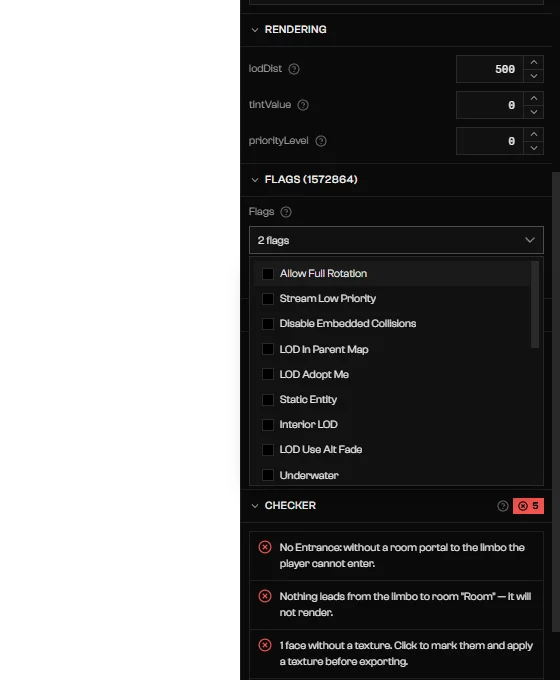
The prop Flags list open.
The rest are named after what they do, and are grouped here:
- Rendering and LOD: Allow Full Rotation, Stream Low Priority, LOD In Parent Map, LOD Adopt Me, Static Entity, Interior LOD, LOD Use Alt Fade, Ignore Time Settings.
- Water and peds: Underwater, Doesn’t Touch Water, Doesn’t Spawn Peds.
- Shadows and reflections: Don’t Render Shadows, Only Render Shadows, Don’t Render Reflections, Only Render Reflections, Don’t Render Water Reflections, Only Render Water Reflections, Don’t Render Mirror Reflections, Only Render Mirror Reflections.
Interior (Part) flags
Select the part row in the tree. Part places the interior in the world and sets its draw distances.Room flags
Also available: Force Freeze, Force Directional Light On, Mirror Potentially Visible.
Portal flags
Also available: Link Interiors Together, Disable Timecycle Modifier, Mirror Using Expensive Shaders, Low LOD Only, Hide when door closed, Mirror Can See Directional, Mirror Using Portal Traversal, Mirror Floor, Mirror Can See Exterior View, Water Surface, Water Surface Extend To Horizon, Use Light Bleed.
Merge exteriors
When you select two or more rooms of a drawn structure, Selected rooms appears with Merge exteriors. It merges the outer walls of those rooms into one outer skin. Groups already merged are expanded, and turning it off removes the selected rooms from the group. Portals stay manual. Each selected room needs its Exterior switch on first; otherwise Merge exteriors is disabled with “Turn on the exterior of all selected rooms to merge.” The section does not appear for an interior imported from the game.1
Turn Exterior on
Turn on Exterior in each room. See Rooms.
2
Select the rooms
Shift+click two or more rooms.3
Turn on Merge exteriors
Turn it on in Selected rooms. To split them again, select the rooms and turn it off.
Troubleshooting
Turn on the exterior of all selected rooms to merge.
Turn on the exterior of all selected rooms to merge.
Merge exteriors is disabled. Turn on Exterior in every selected room.
Accepts a whole number in decimal or hex (0x…), from 0 to 4294967295.
Accepts a whole number in decimal or hex (0x…), from 0 to 4294967295.
The Value field rejected your text. Enter a whole number or a
0x… hex value in range.lodDist … m is smaller than the interior radius (… m).
lodDist … m is smaller than the interior radius (… m).
This is a warning. Raise lodDist on the part so the interior is not cut off at a distance.