
Connect two rooms
Draw two rooms that touch
Click Portal
Check the direction
… → …, from one room to the other. Press F to flip it, or click Flip direction in the sheet.Open the interior to the street
Click Entrance (3) and click twice along an outer wall. The portal goes from the room to the street and is marked Entrance. A structure with rooms needs at least one Entrance. A portal to the street always runs from inside to outside, so Flip direction is disabled for it. A physical door is a prop attached to the portal: see Props in structures.The Portal sheet
Click the portal in the tree. The tree lists portals by an internal id, not a name.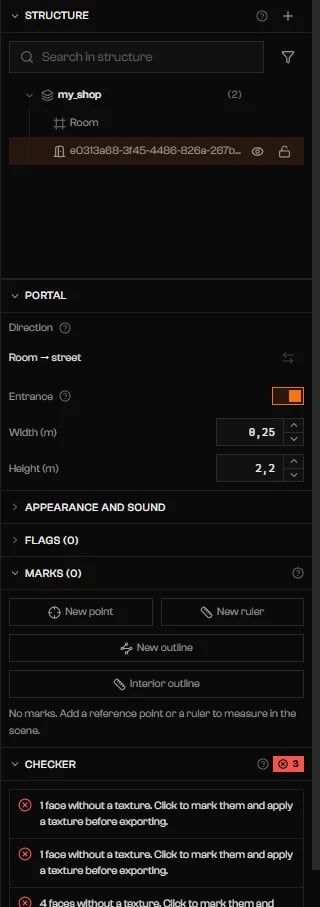
An Entrance portal: Room to street, Entrance on, Width and Height.
Mirrors
A mirror is a portal with the Mirror flag on. Turn it on in Flags, and set mirrorPriority when two mirrors can be in view. The other Mirror … flags are described in Flags. A room also has Mirror Potentially Visible.Openings and windows
Click Scissors (4). Choose Opening in the bar and drag a rectangle over a wall, a floor, or a ceiling face. The hole appears as a row under the part. An opening with no portal is only a hole: the game draws the sky and fog through it. To make it a passage, select it and use the Opening sheet.Cut or split a room
Switch the Scissors bar to Plan. Start an outline on a room, click its vertices, and press Enter to close it. The area inside the outline is removed from that room. Use at least three points, without crossing edges. Backspace removes the last point. If what remains falls into several pieces, the largest keeps the room’s name, portals, and props. The others become new rooms named… (2), … (3), with no portals. Connect them with the Portal tool, or the Checker reports them as unreachable.
Troubleshooting
No Entrance: without a room portal to the limbo the player cannot enter.
No Entrance: without a room portal to the limbo the player cannot enter.
Nothing leads from the limbo to room "…" — it will not render.
Nothing leads from the limbo to room "…" — it will not render.
Portal "…" leads to the limbo but its corners are in outside-to-inside order.
Portal "…" leads to the limbo but its corners are in outside-to-inside order.
Portal "…" is marked as Entrance but does not go to the limbo.
Portal "…" is marked as Entrance but does not go to the limbo.
Portal "…" leaves from and arrives at the same room.
Portal "…" leaves from and arrives at the same room.
Portal "…" points to a room that does not exist (…).
Portal "…" points to a room that does not exist (…).
The corners of portal "…" are not coplanar (… cm off the plane).
The corners of portal "…" are not coplanar (… cm off the plane).
Portal "…" has no area.
Portal "…" has no area.
Portal "…" is … cm from the wall of room "…".
Portal "…" is … cm from the wall of room "…".
The shell did not open the opening for portal "…": it does not fit entirely in a single wall.
The shell did not open the opening for portal "…": it does not fit entirely in a single wall.
An opening in "…" faces the street but has no portal, so the game will not draw the outside through it. Select it and use Set portal; turn Entrance off if it is a window.
An opening in "…" faces the street but has no portal, so the game will not draw the outside through it. Select it and use Set portal; turn Entrance off if it is a window.