
Conectar duas salas
Desenhe duas salas que se tocam
Clique em Portal
Confira a direção
… → …, de uma sala para a outra. Pressione F para invertê-la, ou clique em Inverter a direção na ficha.Abrir o interior para a rua
Clique em Entrada (3) e clique duas vezes ao longo de uma parede externa. O portal vai da sala para a rua e é marcado como Entrada. Uma estrutura com salas precisa de ao menos uma Entrada. Um portal para a rua sempre vai de dentro para fora, então Inverter a direção fica desativado para ele. Uma porta física é um prop preso ao portal: veja Props em estruturas.A ficha do Portal
Clique no portal na árvore. A árvore lista os portais por um id interno, não por um nome.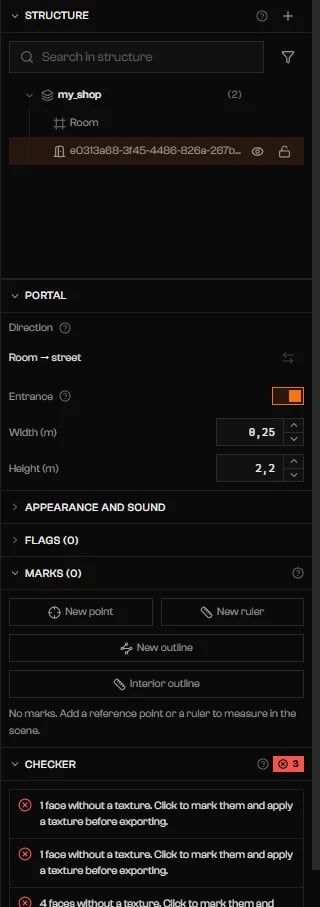
Um portal de Entrada: Sala para rua, Entrada ligada, Largura e Altura.
Espelhos
Um espelho é um portal com a flag Mirror ligada. Ligue em Flags e defina mirrorPriority quando dois espelhos podem estar à vista. As outras flags Mirror … estão descritas em Flags. Uma sala também tem Mirror Potentially Visible.Aberturas e janelas
Clique em Tesoura (4). Escolha Vão na barra e arraste um retângulo sobre uma parede, um piso ou uma face de teto. O buraco aparece como uma linha sob a parte. Um vão sem portal é só um buraco: o jogo desenha o céu e a névoa através dele. Para torná-lo uma passagem, selecione-o e use a ficha Vão.Cortar ou dividir uma sala
Mude a barra da Tesoura para Planta. Comece um contorno sobre uma sala, clique nos vértices e pressione Enter para fechá-lo. A área dentro do contorno é removida dessa sala. Use ao menos três pontos, sem arestas que se cruzem. Backspace remove o último ponto. Se o que sobra se divide em vários pedaços, o maior mantém o nome, os portais e os props da sala. Os outros viram salas novas chamadas… (2), … (3), sem portais. Conecte-as com a ferramenta Portal, ou o Verificador as aponta como inalcançáveis.
Solução de problemas
Nenhuma Entrada: sem um portal de sala para o limbo o jogador não entra.
Nenhuma Entrada: sem um portal de sala para o limbo o jogador não entra.
Nothing leads from the limbo to room "…" — it will not render.
Nothing leads from the limbo to room "…" — it will not render.
Portal "…" leads to the limbo but its corners are in outside-to-inside order.
Portal "…" leads to the limbo but its corners are in outside-to-inside order.
Portal "…" is marked as Entrance but does not go to the limbo.
Portal "…" is marked as Entrance but does not go to the limbo.
Portal "…" leaves from and arrives at the same room.
Portal "…" leaves from and arrives at the same room.
Portal "…" points to a room that does not exist (…).
Portal "…" points to a room that does not exist (…).
The corners of portal "…" are not coplanar (… cm off the plane).
The corners of portal "…" are not coplanar (… cm off the plane).
Portal "…" has no area.
Portal "…" has no area.
Portal "…" is … cm from the wall of room "…".
Portal "…" is … cm from the wall of room "…".
The shell did not open the opening for portal "…": it does not fit entirely in a single wall.
The shell did not open the opening for portal "…": it does not fit entirely in a single wall.
An opening in "…" faces the street but has no portal, so the game will not draw the outside through it. Select it and use Set portal; turn Entrance off if it is a window.
An opening in "…" faces the street but has no portal, so the game will not draw the outside through it. Select it and use Set portal; turn Entrance off if it is a window.